If you were born during daylight saving time, the short answer is: enter the time exactly as it is written on your birth record, together with your full date and birthplace, into a calculator that applies historical time-zone rules. Don't subtract an hour yourself unless that calculator explicitly asks you for standard time or a manual correction.
The rest of this guide explains why, and covers the one situation where the record alone may not be enough: a time that falls in an hour the clocks repeated.
Why you shouldn't subtract an hour yourself
A birth chart is calculated for a moment in universal time (UTC). Your birth record gives a local clock time instead, so every calculator has to convert one into the other. To do that it needs to know which offset from UTC was in force at your birthplace on your birth date, including whether daylight saving time applied.
A calculator that asks for your birthplace and applies historical rules does that conversion for you. If you also subtract an hour before typing the time in, the daylight saving adjustment is applied twice, and the chart is drawn for a moment an hour away from your birth.
Automatic daylight saving handling is not permission to edit the birth record. The record is your evidence. Converting it is the calculator's job.
It also matters that today's offset doesn't settle a historical birthday. Places have adopted daylight saving, dropped it, and moved its start and end dates over the decades. The offset your phone shows today may not be the one that applied where and when you were born. That's why a good calculator asks for the birthplace and full date, not just a time zone you choose today.
One clock label, two moments
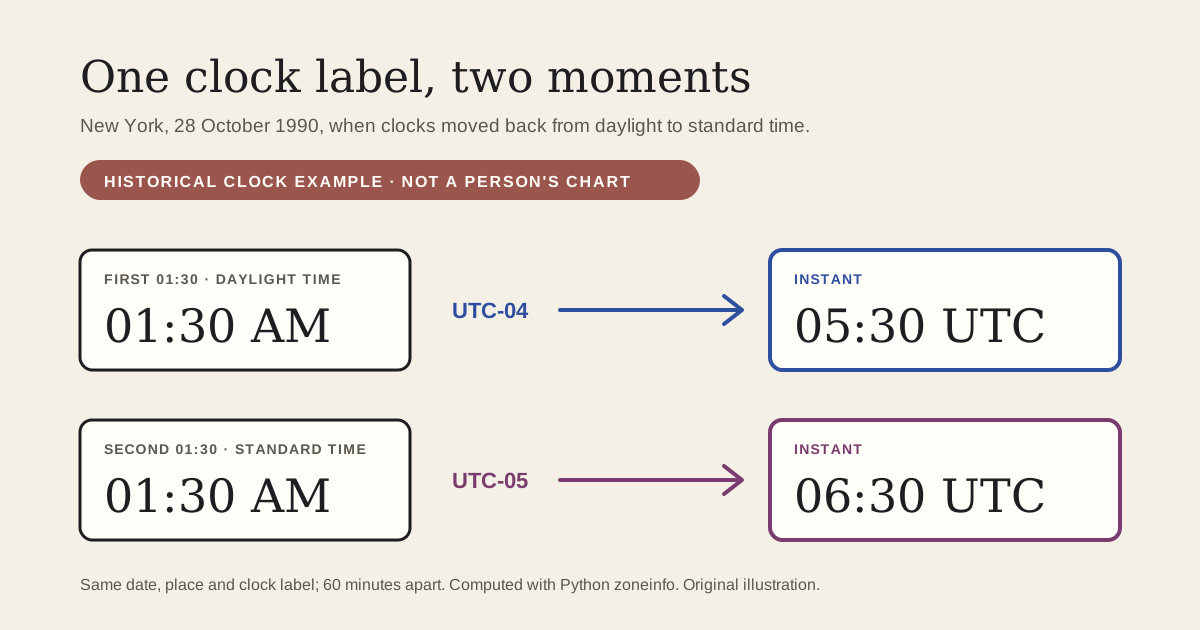
When clocks go back at the end of daylight saving time, an hour of local time happens twice. Here is a historical clock example. It's a hypothetical input, not anyone's birth record or chart.
In New York on 28 October 1990, clocks moved back from daylight time to standard time. A clock reading 01:30 AM showed that time twice that night:
- The first 01:30, still on daylight time at UTC-04, was 05:30 UTC.
- The second 01:30, after the change to standard time at UTC-05, was 06:30 UTC.
Same date, same place, same clock label, and two moments 60 minutes apart. We computed both with Python's standard datetime and zoneinfo libraries. The official Python zoneinfo documentation describes exactly this case: during a transition that creates ambiguous times, such as daylight saving time to standard time, one setting uses the offset from before the transition and the other uses the offset after it. That's a technical reference about clocks. It says nothing about astrology.
So a record that only says "01:30" on a night like that, with no note of daylight time, standard time or an offset, may not identify a single instant.
The opposite happens when clocks go forward: some local times are skipped and never appear on the clock that night. A recorded time inside a skipped stretch is worth checking against the original document.
Which hour repeats or is skipped, and whether it happens at all, depends on the country, the region and the year. There's no single hour shift you can apply to every birthplace.
If your time falls in a repeated or skipped hour
- Look at the original record. Some records note "daylight time", "standard time", a zone abbreviation or an offset. A hospital or registry note may settle it.
- Check the local rules for that date. Confirm that clocks really changed at your birthplace that night, and at what local time. A historical time-zone database or a local archive can tell you.
- If you still can't tell which occurrence it was, treat the time as uncertain. Both charts remain candidates. Our guide to a birth chart without a birth time explains how to work with what stays the same and what doesn't.
Don't pick the chart that feels right, and don't try to infer the time from personality. Neither tells you what the clock said.
What Lunara's calculator does
Enter your recorded local time, date and birthplace. Lunara's calculator converts that local time to UTC using the time-zone rules for that place and date, so you don't adjust for daylight saving yourself.
It doesn't offer a choice between the two occurrences of a repeated hour, and the form does not resolve which occurrence an ambiguous record means. If your recorded time falls in a repeated hour and you don't know which one it was, the chart you get is one of two candidates, not a confirmation.
When two charts disagree
If two sites give you different charts, compare the inputs before comparing interpretations:
- the full date, including the year;
- AM or PM;
- the exact town and country;
- how the time was entered: local clock time, standard time or UTC;
- the zodiac framework (tropical or sidereal) and the house system.
An hour's difference matters most for the Rising sign and the houses, which depend strongly on the time. If the Moon or another planet is close to the edge of a sign, it can also land in a different sign. That doesn't mean every placement changes over an hour; how much moves depends on the chart. Our checklist on why birth charts differ goes through the comparison step by step.
Your chart
Once your date, time and birthplace are established, calculate your free birth chart.
If you'd like it written out afterwards, an automated personal birth chart reading is optional and paid. It's a symbolic interpretation of the chart from the details you enter. It can't recover missing birth data or decide which repeated hour your record means. You can read the complete fictional sample first, and the current price for your country is shown before you decide.
Sources: the clock example was computed for this article with Python's standard library (datetime and zoneinfo, America/New_York, 28 October 1990). It is a historical clock example, not a person's birth record or chart. Ambiguous-time behaviour as described in the official Python zoneinfo documentation, read October 14, 2026. Text written with AI assistance and reviewed against those sources. The illustration is original.